
Home › Discussions › Campaign Portal Building › Banner image under dragon & campaign name - Campaign Portal Building Discussions on Obsidian Portal Community Forums
Banner image under dragon & campaign name

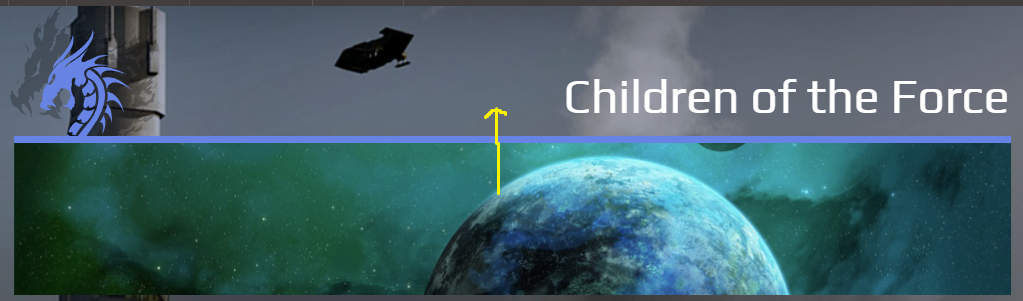
Is there a good way to put banner image up in the are where the OP dragon and campaign name are displayed?
I've been tinkering for a while now, and not come up with anything that works.
Post edited by GM_Theo on

Howdy, Stranger!
It looks like you're new here. If you want to get involved, click one of these buttons!


Comments
If you mean like I've done here, yes: https://streamofkairos.obsidianportal.com/
You'd use something like this CSS:
GM of Stream of Kairos - 2025 Campaign of the Year
GM of Rise of the Durnskald: Wrath of the Fallen Goddess - February 2016 CotM
GM of Core: The Ashes of Alcarna - April 2020 CotM
Need CSS Help? It may be covered here: Abersade's CSS Hub
Why the heck does anything break the formatting when it's in a code box. Just... why. The whole point of a code box is to prevent that exact issue. It should look like this:
GM of Stream of Kairos - 2025 Campaign of the Year
GM of Rise of the Durnskald: Wrath of the Fallen Goddess - February 2016 CotM
GM of Core: The Ashes of Alcarna - April 2020 CotM
Need CSS Help? It may be covered here: Abersade's CSS Hub
Sort of like that, but not entirely.
I'd like the keep the dragon and campaign name, with the banner image as the background in that space.
I can't use .campaign-public-header, because that's too large a space.There's a div.row inside that that comes pretty close, but it extends past the blue line on the left & right.
There's the div.flame-dragon and div.campaign-public-title-container, but they extend to fill the div.row, and I'm not sure how I'd set the background to span those two elements if I can't use the div.row to do the job.
That's a bit more involved.
.campaign-public-layout #campaign-summary-row .campaign-public-title-container {height: 195px; position: absolute;}.campaign-public-layout .flame-dragon {position: absolute; margin-top: 69px;}
.campaign-public-layout #banner-container {opacity: 0%; position: absolute; right: 15px; left: 15px; top: 0px;}
#campaign-summary-row > div > div.row {background-image: url('https://db4sgowjqfwig.cloudfront.net/campaigns/116239/banners/1438358/Please-Stand-By2.jpg?1723664199'); height: 199px; margin-left: 0px; margin-right: 0px; background-size: cover;}
.campaign-public-layout #banner-container .campaign-banner-image {padding-bottom: 14%;}
GM of Stream of Kairos - 2025 Campaign of the Year
GM of Rise of the Durnskald: Wrath of the Fallen Goddess - February 2016 CotM
GM of Core: The Ashes of Alcarna - April 2020 CotM
Need CSS Help? It may be covered here: Abersade's CSS Hub
You will need to change the background-image link to match whatever your banner image is.
GM of Stream of Kairos - 2025 Campaign of the Year
GM of Rise of the Durnskald: Wrath of the Fallen Goddess - February 2016 CotM
GM of Core: The Ashes of Alcarna - April 2020 CotM
Need CSS Help? It may be covered here: Abersade's CSS Hub
You may also need to adjust some of the parameters to account for width differences if your campaign is not set to be 1400px wide.
GM of Stream of Kairos - 2025 Campaign of the Year
GM of Rise of the Durnskald: Wrath of the Fallen Goddess - February 2016 CotM
GM of Core: The Ashes of Alcarna - April 2020 CotM
Need CSS Help? It may be covered here: Abersade's CSS Hub
Thanks. I'll give that a shot, and report back when I have the chance.
Thanks for the assist. With a little tinkering, this is what I ended up with:
Very nice! Glad to help!
GM of Stream of Kairos - 2025 Campaign of the Year
GM of Rise of the Durnskald: Wrath of the Fallen Goddess - February 2016 CotM
GM of Core: The Ashes of Alcarna - April 2020 CotM
Need CSS Help? It may be covered here: Abersade's CSS Hub